Using GitLab runners as an AWS CodePipeline build provider
A customer wanted to build their application on GitLab while keeping AWS CodePipeline for source and deployment, so I designed a custom build stage that hands each commit to a GitLab hosted runner and returns the result to AWS.
- AWS CodePipeline
- GitLab
TL;DR
- Goal
- Let a customer build their application with GitLab CI while keeping CodePipeline for source and deployment.
- Actions
- Designed a custom CodePipeline build stage. A Lambda function triggers a GitLab pipeline, which fetches the artifact from S3, builds it on a hosted runner and reports back to CodePipeline.
- Outcome
- A working end-to-end pipeline from CodeCommit commit to CloudFormation deployment, with the build running entirely on GitLab.
The task
A customer reached out wanting to integrate AWS CodePipeline with GitLab. Their source code and deployments lived in AWS, but they wanted their builds to run on GitLab CI. CodePipeline doesn’t offer GitLab as a build provider out of the box, so I designed one.
What I designed
The pipeline keeps CodePipeline in charge, but replaces the usual CodeBuild stage with a hand-off to GitLab:
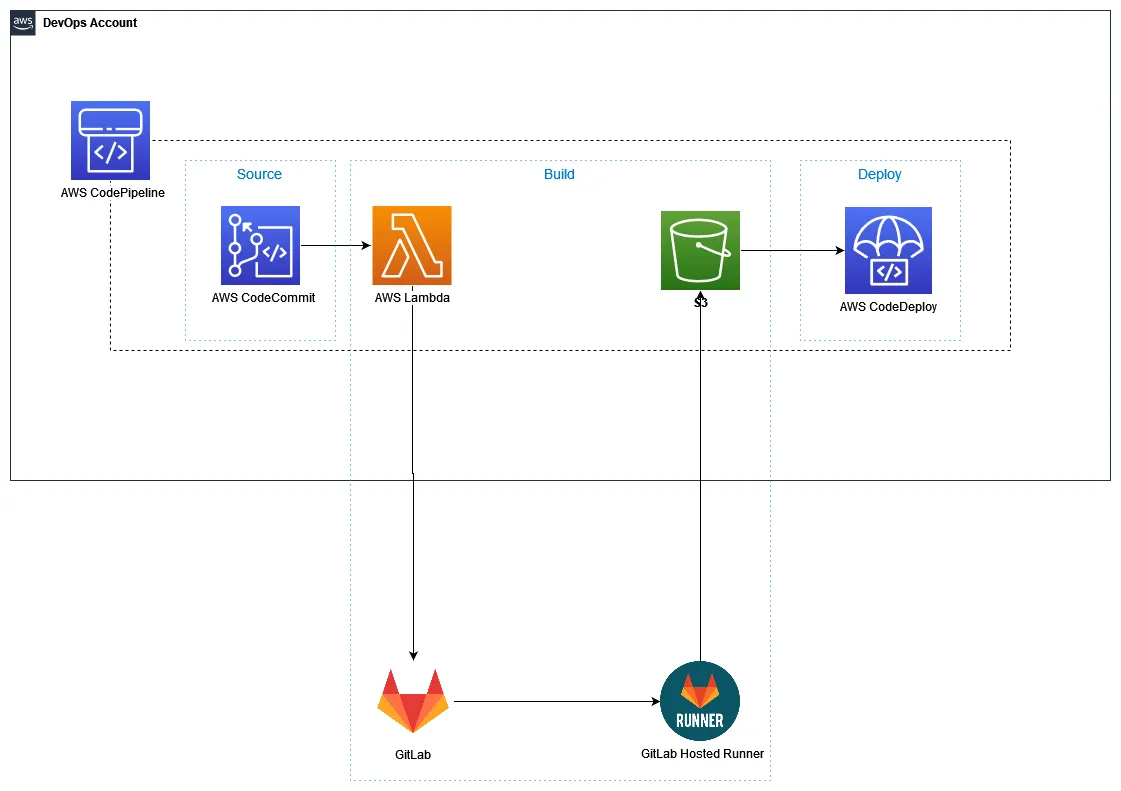
- The application code (artifact) is stored in AWS CodeCommit.
- A new commit starts the pipeline.
- The build stage invokes a Lambda function, which calls the GitLab pipeline API.
- GitLab fetches the artifact from S3, along with the CI file that tells it how to build it.
- A GitLab hosted runner builds the code, in this case a CDK application.
- The built artifact is returned to S3, GitLab tells CodePipeline the build succeeded, and the deploy stage takes over.
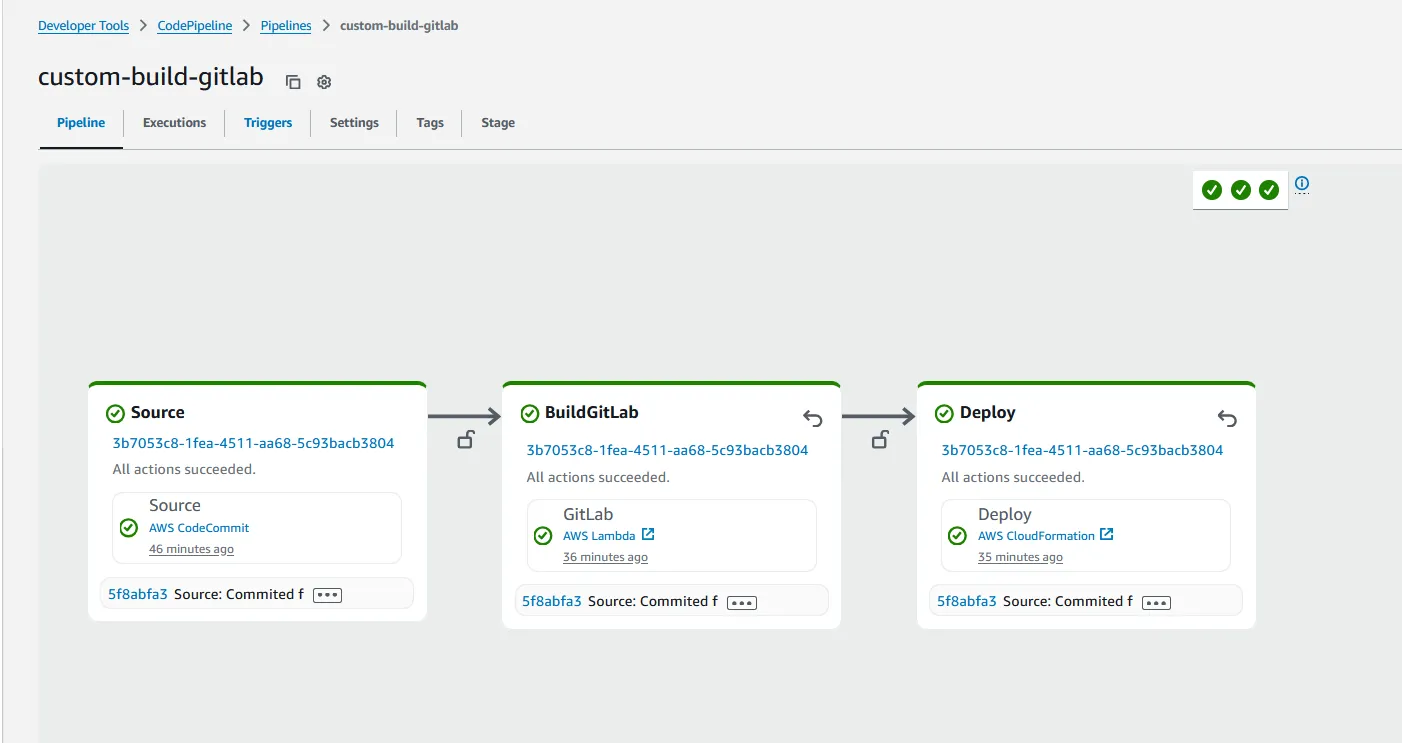
Step 1: Handing the build to GitLab
CodePipeline invokes a Lambda function for the build stage. The function reads the artifact locations and the job ID from the CodePipeline event, then starts a GitLab pipeline with them as variables:
const job_id = event['CodePipeline.job'].id;
const bucket = event['CodePipeline.job'].data.inputArtifacts[0].location.s3Location.bucketName;
const input_artifact_key = event['CodePipeline.job'].data.inputArtifacts[0].location.s3Location.objectKey;
const build_artifact_key = event['CodePipeline.job'].data.outputArtifacts[0].location.s3Location.objectKey;

const options = {
    hostname: 'gitlab.com',
    path: `/api/v4/projects/${process.env.GITLAB_PROJECT_ID}/pipeline`,
    method: 'POST',
    headers: { 'PRIVATE-TOKEN': process.env.GITLAB_PAT, 'Content-Type': 'application/json' }
};
GitLab needs four variables to do its job:
S3_BUCKET: the bucket holding the artifact.INPUT_ARTIFACT_KEY: where to fetch the source from.BUILD_ARTIFACT_KEY: where to put the built code.CODEPIPELINE_JOB_ID: so GitLab can tell CodePipeline when the build is done.
Step 2: Fetching the artifact without storing AWS keys
The GitLab pipeline needs to read from and write to S3. Rather than storing long-lived AWS access keys in GitLab, each job requests an OIDC token from GitLab and exchanges it for temporary AWS credentials that last 15 minutes:
id_tokens:
  GITLAB_OIDC_TOKEN:
    aud: https://gitlab.com
script:
  - >
    aws_sts_output=$(aws sts assume-role-with-web-identity
    --role-arn ${ROLE_ARN}
    --role-session-name "GitLabRunner-${CI_PROJECT_ID}-${CI_PIPELINE_ID}-getCodePipelineArtifact"
    --web-identity-token ${GITLAB_OIDC_TOKEN}
    --duration-seconds 900
    --query 'Credentials.[AccessKeyId,SecretAccessKey,SessionToken]'
    --output text)
  - aws s3api get-object --bucket ${S3_BUCKET} --key ${INPUT_ARTIFACT_KEY} artifact.zip
The artifact includes its own CI file, .passed-gitlab-ci.yml. GitLab runs it as a child pipeline using include, so each application defines its own build steps instead of them being hard-coded in this repository.
Step 3: Building on a GitLab hosted runner
The child pipeline installs the CDK and the AWS CLI on a Node.js image, synthesises the application, and uploads the result to the location CodePipeline expects:
build code:
  stage: build
  image:
    name: node:22-slim
  script:
    - npm install -g aws-cdk
    - cd extractedArtifact
    - npm i
    - cdk synth
    - zip -r buildArtifact.zip ./cdk.out/*
    - aws s3api put-object --bucket ${S3_BUCKET} --key ${BUILD_ARTIFACT_KEY} --server-side-encryption aws:kms --body buildArtifact.zip
Step 4: Reporting back to CodePipeline
CodePipeline waits until it’s told the build has finished. The last GitLab job uses the job ID passed in by Lambda to mark it as a success, and tells CodePipeline where the built artifact is:
- >
  aws codepipeline put-job-success-result
  --job-id $CODEPIPELINE_JOB_ID
  --output-variables "{\"artifactName\":\"BuildArtifact\",\"artifactPath\":\"${BUILD_ARTIFACT_KEY}\"}"
The pipeline then moves on to the deploy stage, which deploys the synthesised CloudFormation template. For this demo the template created a single S3 bucket:
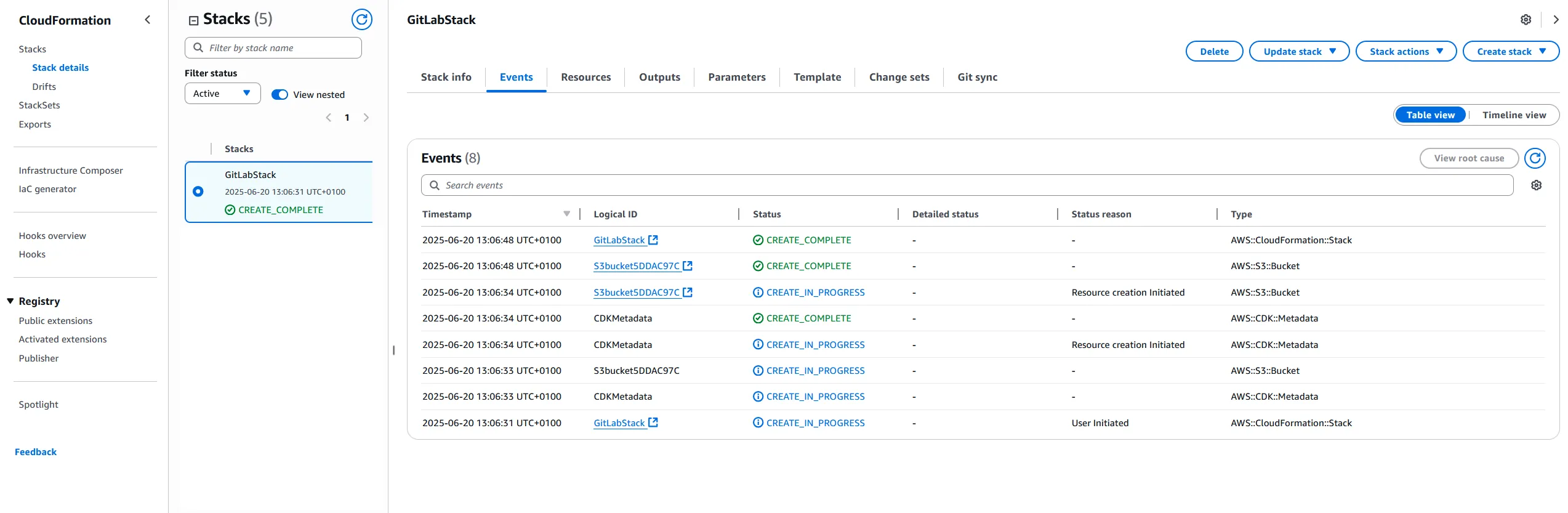
The result
A commit to CodeCommit now flows through a GitLab build and into a CloudFormation deployment, with no manual steps and no AWS keys stored in GitLab. The customer kept CodePipeline as their single view of each release, while the build itself ran on GitLab.