I designed it to fail, then I demoed it to 150 AWS partners
I designed a reusable CDK demo simulating issues (SSL misconfigurations, timeouts, deployments, version drift) and presented it to 150+ partner managers, solutions architects and engineers.
Cloud Support Engineer II, Amazon Web Services
- AWS CDK
- Support Tooling
- Presenting
TL;DR
- Goal
- Showcase how a new suite of support tools can be used to resolve incoming tickets.
- Actions
- Designed and built a TypeScript CDK app that deploys a web app (load balancer, EC2, SSL certificate, domain, CI/CD pipeline) with deliberate failures for SSL, timeouts, permissions and version drift.
- Outcome
- Delivered live demo and presentation to partner managers, SAs and engineers; onboarded a second presenter to scale delivery.
- Learnings
- Presenters who didn't know the CDK found it difficult to run the application, next time I'd containerise the app.
The task
A new suite of support tools was launched for a number of key AWS services including Elastic Load Balancing, Route 53, CodePipeline and Certificate Manager. I was tasked with demonstrating these tools to the partners.
What I designed
I built a secure, scalable web application with CI/CD integration. The AWS TypeScript Cloud Development Kit (CDK) managed the infrastructure, including the load balancer, EC2, SSL certificate, domain and CI/CD pipeline. The pipeline deployed the application to EC2.
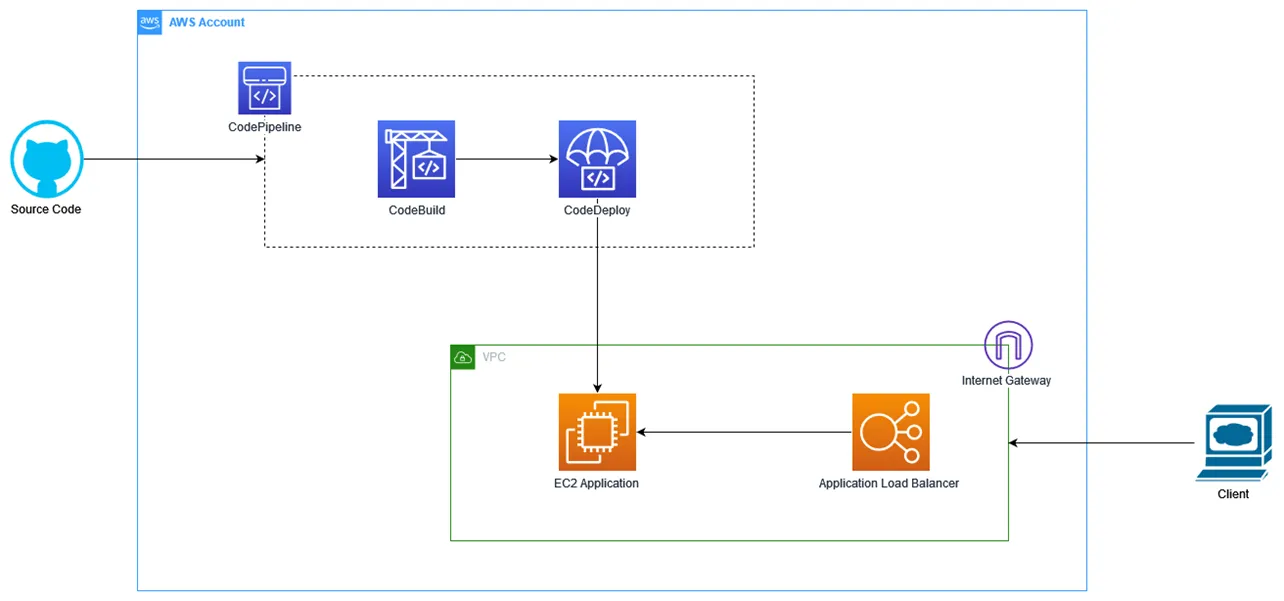
I identified some common support case types and wrote the CDK code to create the following:
- Issue 1 - SSL misconfiguration
- Issue 2 - Timeouts
- Issue 3 - Permissions
- Issue 4 - Version drift
Issue 1: SSL misconfiguration
The CDK application deploys the load balancer listener with an incorrect “dev” certificate:
        // ISSUE 1 : The DEV domain cert is associated with the load balancer however the user is accessing the application via PROD domain
        this.albHttpsListener = new elbv2.ApplicationListener(this, 'HttpsListener', {
            loadBalancer: applicationElb,
            port: 443,
            certificates: [
                acmCertDev
            ]
        })
During demonstration I access the application. This application was publicly hosted allowing the attendees to follow along.
An insecure connection warning appears:
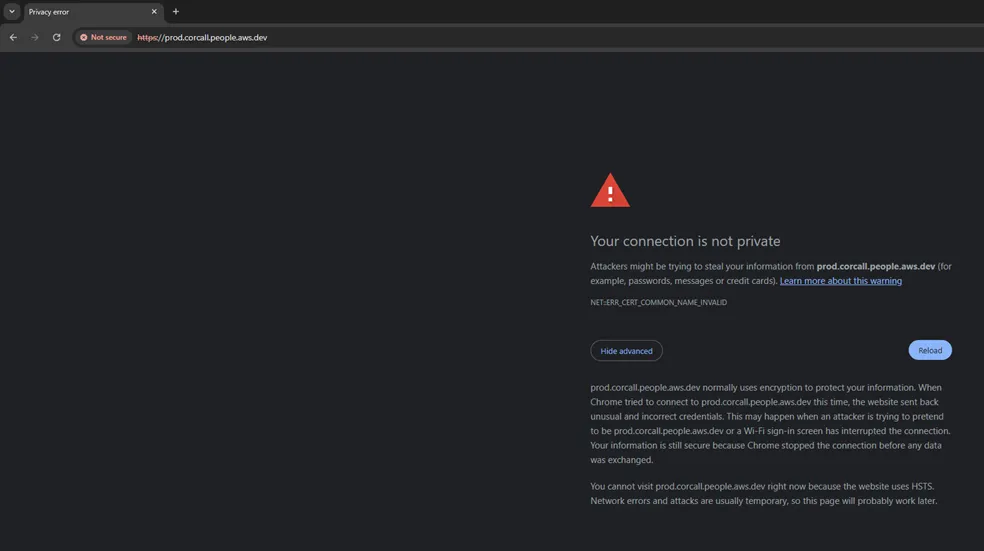
My client side troubleshooting via the browser tools shows the incorrect certificate is assigned. The new support tooling gives us read access to the load balancer and the certificates deployed in the AWS account. From here we can review the listeners and the certificates, gathering the data required for a conclusive update to the user.
Issue 2: Timeouts
The CDK application defines a security group for EC2 however it doesn’t allow any HTTP traffic:
        // ISSUE 2: The security group does not allow inbound HTTP traffic, required for a web app
        instanceSecurityGroup.addIngressRule(ec2.Peer.anyIpv4(), ec2.Port.SSH, 'allow SSH access from world');
During demonstration I access the application again and it eventually returns a timeout error. At this stage the floor is opened up for discussion to the possible causes. Some correctly guess the firewall.
The new support tooling allowed us to review the security groups assigned to the load balancer and EC2. We confirmed the load balancer security group was correctly configured however the EC2 group didn’t allow any traffic from the load balancer.
Issue 3: Permissions
The CDK application defines a deployment role that has insufficient permissions, EC2 must be able to pull pipeline artifacts from S3:
        // ISSUE 3 : An EC2 Instance profile that does not have sufficient permissions to pull deploy artifact from S3
        const ec2Role = new iam.Role(this, 'DeployRole', {
            assumedBy: new iam.ServicePrincipal('ec2.amazonaws.com'),
            description: 'Created and managed by the CDK',
            managedPolicies: [
                iam.ManagedPolicy.fromAwsManagedPolicyName('AmazonEC2ReadOnlyAccess')
            ]
        });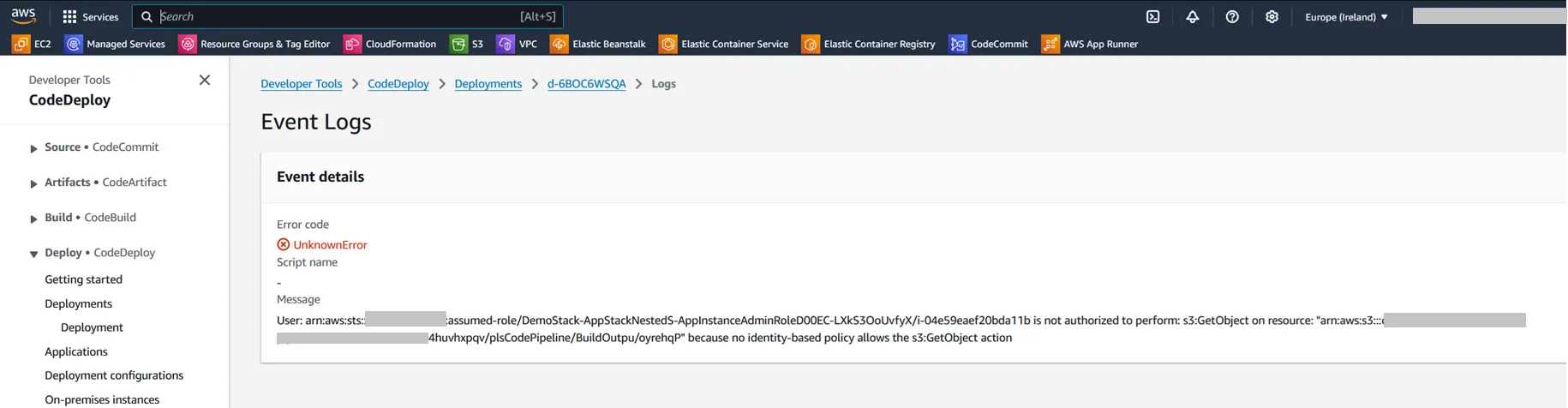
The support tooling allowed us to review the pipeline and recent deployments, from here we identified the permissions error. We proceeded to use the IAM tool to confirm S3 permissions were missing.
Issue 4: Version drift
The EC2 installed nginx to serve the application files, this adds a default nginx html file to the site root.
        const userDataLinux = ec2.UserData.custom(
            `#!/bin/bash
              dnf update -y
              dnf install nginx -y
              systemctl start nginx
              systemctl enable nginx
Resolving the previous permissions issue allowed the user to run a successful deployment, resulting in the correct application version being deployed overwriting the default nginx file.
Presenting it to 150+ partners
I added this application to a presentation and together with colleagues presented it to the partners over a number of sessions. This was an enjoyable experience and thankfully the application worked as expected each time. On one occasion, a company had a conferencing tool preference which I hadn’t configured and my audio wasn’t working. I handled this calmly and requested they join me via their browser on our in-house tools to complete the demo.
What I’d do differently
- As demand for the session increased I onboarded another engineer to deliver the session. They were unfamiliar with the CDK, next time I’d containerise the application.
- Feedback for the demo ranged from “very informative” to “overly simple”. Next time I’d develop tiered entry and advanced level issues.