Keeping App Runner traffic private with a VPC endpoint
I built a containerised Node.js sample that sends App Runner's outbound requests to SQS through a VPC endpoint. This was requested for public release by the App Runner development team.
- AWS App Runner
- VPC
- SQS
TL;DR
- Goal
- Show support engineers how an App Runner service can reach an AWS service privately, through a VPC connector and a VPC endpoint.
- Actions
- Built a containerised Node.js app that sends messages to SQS, and a CloudFormation template that deploys it with a private VPC, an SQS VPC endpoint and the IAM, queue and security group policies to lock it down.
- Outcome
- Internal article was written and the App Runner development team subsequently requested this be released publicly.
- Learnings
- I learned that speed of delivery is important. By the time the application completed its security review and was ready for publication, the service was not open for new customers.
The task
By default, an AWS App Runner service sends its outbound traffic over the public internet. That includes calls to other AWS services, such as Amazon SQS. Customers with stricter network requirements want those calls to stay inside their own network.
App Runner supports this with a VPC connector, but it’s easy to get wrong: once outbound traffic goes through your VPC, the app can only reach whatever that VPC can reach. I built a sample application to show the full setup working end to end.
What I designed
The sample is a small Express web app with a single form. A visitor enters a number, and the app sends it to an SQS queue using the SendMessage API.
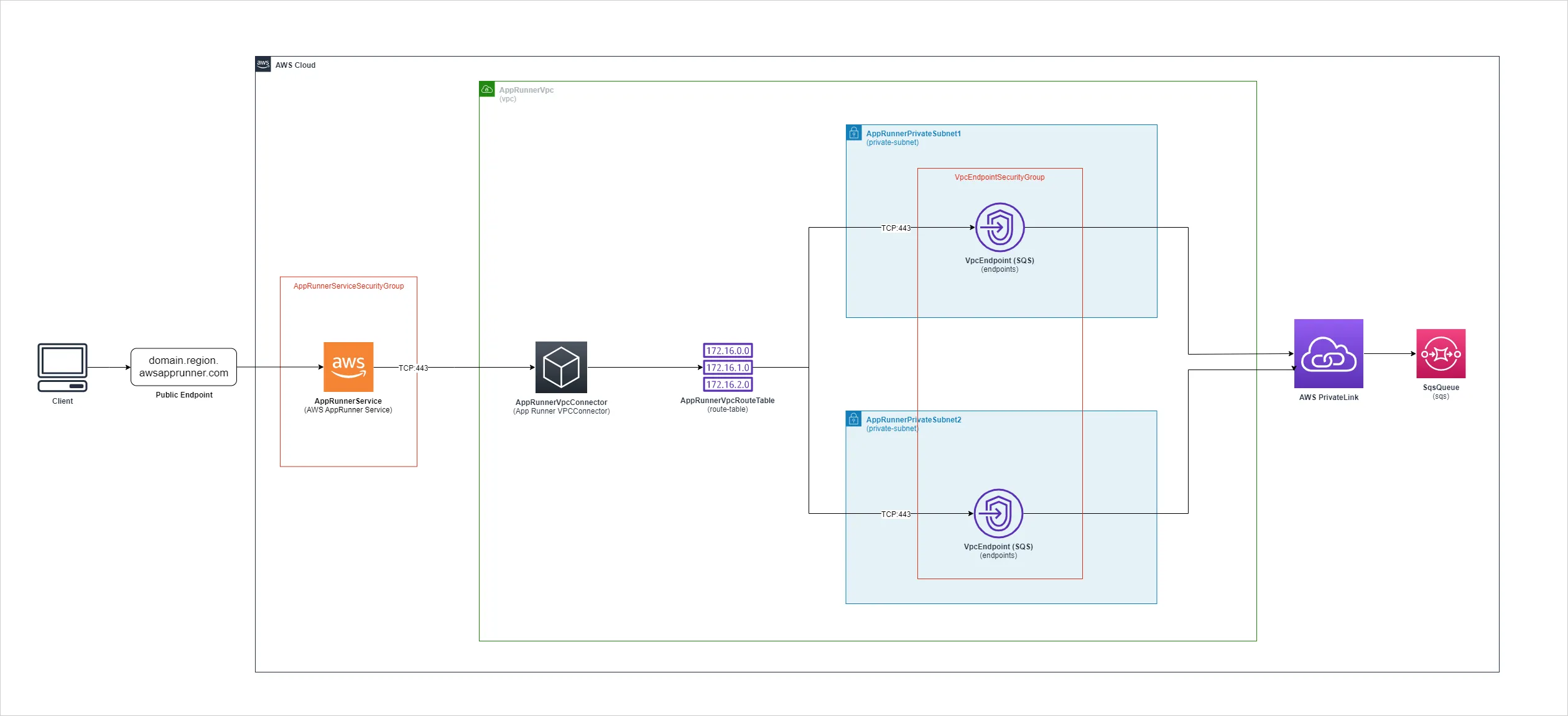
- A visitor uses the App Runner service’s public URL as normal.
- The app’s outbound requests leave through a VPC connector into a private VPC.
- The VPC has no internet gateway or NAT, so the only place requests can go is an SQS interface endpoint in two private subnets.
- The endpoint carries the request to the queue over AWS PrivateLink, without it touching the public internet.
A CloudFormation template deploys everything: the VPC, subnets, security groups, endpoint, VPC connector, App Runner service, queue and IAM role.
Step 1: The container
The app is packaged as a container image based on Amazon Linux, and listens on port 3000:
FROM public.ecr.aws/amazonlinux/amazonlinux:2023-minimal

# ...install Node.js 21 with nvm...

WORKDIR /usr/src/
COPY app ./
COPY package*.json ./
RUN npm install

EXPOSE 3000
CMD [ "node", "app.js" ]
The SQS client reads its region and queue from environment variables, which App Runner sets from the CloudFormation template:
const AWS_REGION = process.env.AWS_REGION
const SQS_QUEUE = process.env.SQS_QUEUE

const sqsClient = new SQSClient({ region: AWS_REGION });

async function sendSqsMessage(messageBody) {
  const command = new SendMessageCommand({ QueueUrl: SQS_QUEUE, MessageBody: messageBody });
  return await sqsClient.send(command);
}
Step 2: Routing outbound traffic into the VPC
Setting the egress type to VPC is what sends the app’s outbound requests through the VPC connector, instead of out to the internet:
AppRunnerService:
  Type: AWS::AppRunner::Service
  Properties:
    SourceConfiguration:
      ImageRepository:
        ImageIdentifier: !Ref EcrImageId
        ImageConfiguration:
          Port: "3000"
          RuntimeEnvironmentVariables:
            - Name: AWS_REGION
              Value: !Sub ${AWS::Region}
            - Name: SQS_QUEUE
              Value: !Ref SqsQueue
    NetworkConfiguration:
      EgressConfiguration:
        EgressType: VPC
        VpcConnectorArn: !Ref AppRunnerVpcConnector
Step 3: The SQS VPC endpoint
The interface endpoint sits in both private subnets. With private DNS enabled, the app keeps using the normal SQS hostname, which now resolves to the endpoint’s private IP addresses, so no code changes are needed:
VpcEndpoint:
  Type: AWS::EC2::VPCEndpoint
  Properties:
    VpcEndpointType: Interface
    PrivateDnsEnabled: true
    ServiceName: !Sub 'com.amazonaws.${AWS::Region}.sqs'
    SubnetIds:
      - !Ref AppRunnerPrivateSubnet1
      - !Ref AppRunnerPrivateSubnet2
Step 4: Locking it down
Each layer only allows what the app needs:
- Security groups: the App Runner service can only send HTTPS (port 443) to the endpoint’s security group, and the endpoint only accepts HTTPS from inside the VPC.
- Endpoint policy: only the App Runner instance role can use the endpoint, and only for this queue.
- Queue policy and IAM role: the queue only accepts messages from the App Runner instance role.
PolicyDocument:
  Statement:
    - Effect: Allow
      Principal:
        AWS: !GetAtt AppRunnerInstanceRole.Arn
      Action:
        - "SQS:SendMessage"
      Resource:
        - !GetAtt SqsQueue.Arn
The app also sanitises the SQS response before rendering it, and sets secure response headers such as X-Frame-Options and Strict-Transport-Security.
The result
Deploying the stack gives a working App Runner service whose calls to SQS travel entirely over private networking. Messages sent from the form can be seen by polling the queue in the SQS console.